Details
Description
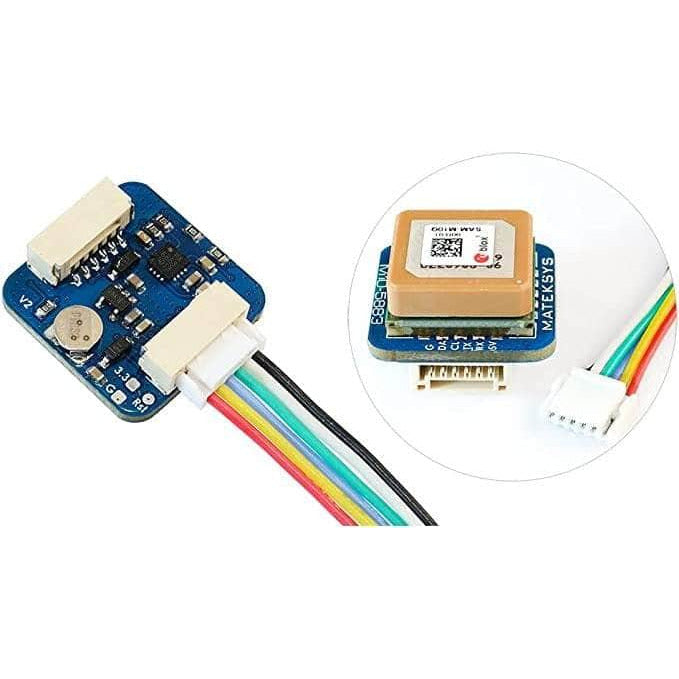
The MATEKSYS M10Q-5883 supports GNSS (GPS, GLONASS, Galileo, and BeiDou) and thus offers excellent RF sensitivity. The SAM-M10Q uses a multi-constellation GNSS module powered by u-blox SAM-M10Q-00B. The SAM-M10Q features the u-blox M10 standard precision GNSS platform and provides exceptional sensitivity and acquisition time for all L1 GNSS signals. This feature will help you pick up the best signals. But also enhance the dynamic position accuracy with small antennas or in non-line-of-sight scenarios. The high number of visible satellites enables the receiver to select the best signals. Hence this maximizes the position availability, in particular under challenging conditions such as in deep urban canyons. The high-gain 15x15mm2 patch antenna provides the best balance between performance and small size. The omnidirectional antenna radiation pattern increases flexibility for device installation.
Check out all our GPS modules, and our full line of Matek products!


Features
- M10-5883 uses multi-constellation GNSS powered by u-blox SAM-M10Q-00B
- Ultra-low-power GNSS antenna module for easiest integration
- Simple design-in with no RF expertise required
- Less than 38 mW power consumption without compromising GNSS performance
- Maximum position availability with 4 concurrent GNSS reception
- Advanced spoofing and jamming detection
- Pin-compatible with previous SAM-M8Q
Specifications
- GNSS u-blox SAM-M10Q-00B (GPS, GLONASS, Galileo, and BeiDou)
- Magnetic Compass QMC5883L
- Patch antenna 15x15x4mm
- Input voltage range: 4~9V (5V pad/pin)
- Power consumption: 13mA
- UART baudrate: 9600 default
- Operating Temperatures: -20~80 °C
- UART(TX, RX) interface for GNSS SAM-M10Q-00B
- I2C(DA, CL) interface for Compass QMC5883L
- JST-GH-4P connector (SM04B-GHS-TB). 1.27mm pitch
- GNSS PPS LED, Green. (Solid ON after powering on, blinking(1Hz) when GNSS get 3D fix)
- Protocol: UBX(u-blox) 5Hz@GPS+GAL+BDS B1C+GLO or NMEA 1Hz
- 20mmx20mmx12.4mm
- 8g
- Wiring and Settings
- M10Q-5883 5V to Flight controller 4~9V
- M10Q-5883 RX to Flight controller UART_TX
- M10Q-5883 TX to Flight controller UART_RX
- M10Q-5883 CL to Flight controller I2C_SCL
- M10Q-5883 DA to Flight controller I2C_SDA
- M10Q-5883 G to Flight controller GND
Tips
- INAV 5.0.0, Betaflight 4.3.0, ArduPilot 4.3 or newer is required.
- UBlox NEO-M9N, MAX-M10S, SAM-M10Q series all don’t have dataflash built in. once GNSS is powered off and the supercapacitor run out. the settings will back to default.
- UBX protocol is bidirectional. Flight controller firmware can change settings on GPS via UBX protocol. You don’t need to set GNSS module Baud and Frequency in u-center.
- The default configuration on SAM-M10Q-00B with ublox FW 5.1 is concurrent reception of GPS, Galileo, GLONASS, and BeiDou B1C with QZSS and SBAS enabled.
- Start with u-blox GNSS FW3.01, timepulse is aligned with UTC time and that time is set valid only after leap second is downloaded. That could take up to 12.5 min. Probably PPS LED will not blink immediately after GPS has 3D fixed.
- The SAM-M10Q provides the ability to reset the receiver. Bridging “RST” pad to Ground for at least 100 ms will trigger a cold start. RESET will delete all information and trigger a cold start. It should only be used as a recovery option. If you are sure wiring and setup are all right. but flight controller can’t detect the GNSS module(grey GPS icon), try doing reset.
- The scratches on ceramic antenna are the result of tuning the antenna.
- Troubleshoot GPS related issues: http://www.mateksys.com/?p=5712#tab-id-6
- u-center Windows
Important Notes
- Compass Alignment(flat mounting): Tilting the magnetometer is strongly discouraged !
- INAV/BetaFLight: compass Arrow forward, set CW 270° Flip when flight controller arrow is facing forward.
- INAV/BetaFLight: compass Arrow backward, set CW 90° Flip when flight controller arrow is facing forward.
- Ardupilot/Mission Planner: Rotation None.
- Make sure to have compass/magnetometer 10cm away from power lines/ESC/motors/iron based material
Includes
- 1x Matek M10Q-5883 GNSS & Compass
More Info
-
SKU:
20430
-
Barcode:
691023444577